Morrow vs TickTick: which is right for you?
TickTick calls itself “your all-in-one productivity app”1, and that’s an honest description: tasks, a calendar, a focus timer, a habit tracker and more, on almost every device you might own. If you want all of that in one place, TickTick does it well. Morrow does fewer things on purpose, and adds one thing TickTick doesn’t try to be: a companion. You keep every project on one board, choose a few cards for today, and a small cloud in the corner hands you your day each morning and closes it with you each evening.
I make Morrow, so this is the maker’s view, not an independent review. What I say about TickTick comes from TickTick’s own website and help centre, read on 18 October 2026, and each claim links to its page at the bottom. Jump to the comparison
No card needed.
The short answer
Pick TickTick if you want everything in one app: your tasks, a calendar you can plan by the hour, a Pomodoro timer, a habit tracker and an Eisenhower Matrix. It also has apps for your watch and for Windows and Linux, and a free plan you can keep. Pick Morrow if you’d rather have fewer things to keep track of and someone keeping track with you: one board for every project, a Today you fill yourself, and a small cloud in the corner that does some of the remembering for you, morning and evening. Morrow has no timer, no habit tracker and no free plan after the first month.
Where TickTick is the better choice
I’ll start here, because for many people this settles it. An all-in-one app that still holds together is hard design work: every tool you add is one more screen that has to make sense next to all the others. According to TickTick’s own pages, it brings together:
- Focus and habit tools. A Pomodoro timer and a stopwatch,4 a habit tracker,5 and an Eisenhower Matrix that sorts your tasks into four quadrants.6
- A calendar you plan in. TickTick can show Google, Outlook, iCloud, Exchange, CalDAV and URL calendars,7 and you can drag tasks into time slots to plan your day by the hour.8
- Apps almost everywhere. iPhone, iPad, Android, Windows, Mac and Linux, plus a browser extension,10 and apps for Apple Watch and Wear OS.14
- A free plan you can keep. The Free plan allows 9 lists with up to 99 tasks each, with reminders and sync.12
- Sharing. You can share a list, assign tasks and leave comments.11
- AI built in. An AI Assistant that can create tasks and break down projects, and voice input that turns speech into tasks.9
If you want those tools, and you want them in the same app as your tasks, choose TickTick. Morrow has no timer, no habit tracker and no matrix, and you can’t share a board with anyone.
Why Morrow leaves those tools out
I’ve designed digital products for almost twenty years, and the pattern I see most often is a simple tool slowly turning complicated. Nobody plans it. Each feature makes sense on the day it arrives. After a while, though, the app itself needs looking after: a timer to start, habits to tick, a matrix to keep sorted, a calendar to fill hour by hour.
For people who enjoy running that kind of system, it’s the whole appeal, and TickTick serves them well. But many productivity tools don’t lack features. They become one more thing to manage, and the people I make Morrow for usually have plenty of those already. So Morrow has a few parts, and I’ve spent my time on how those few parts work.
The biggest difference: a companion instead of another tool
TickTick has good pieces of this. Its AI Assistant creates tasks and breaks down projects when you ask it to.9 A daily notification reports what you finished and what you didn’t,15 and Suggested Tasks in Today helps you decide what to focus on, based on due dates and what you keep rescheduling.16 They’re separate features, though, and TickTick also rewards use with an achievement score, levels and badges for the days you’ve opened it.17 Morrow has AI too, but what sets it apart is a companion: a small cloud in the corner of the app. I drew it myself, and it talks in short notes with clear buttons, never in a chat window.
- In the morning, the first time you open Morrow, it asks whether you want your brief: what you finished yesterday, where you left off and what’s on today.
- During the day, it notices the card that hasn’t changed in weeks and offers to break it into small steps, and it sees the card you keep moving forward. Ask it to Help me choose, and it suggests a few cards for today with a reason you can check.
- In the evening, at the hour you choose, it offers to close the day with you, and then it says good night.
- After a while away, it says “There you are.” and names the card you last worked on, so you know where to pick up.
Its face says what it’s up to: busy while it reads, pleased when you tick a card off, asleep when you’ve left it alone for a while. It never counts streaks or hands out points, and most of what it says it works out from your own board, on your device, without AI. For the people I make Morrow for, that’s the difference that matters: one fewer thing to look after, and something that looks after the day with you.
What Morrow does instead
You fill Today, and it has a limit
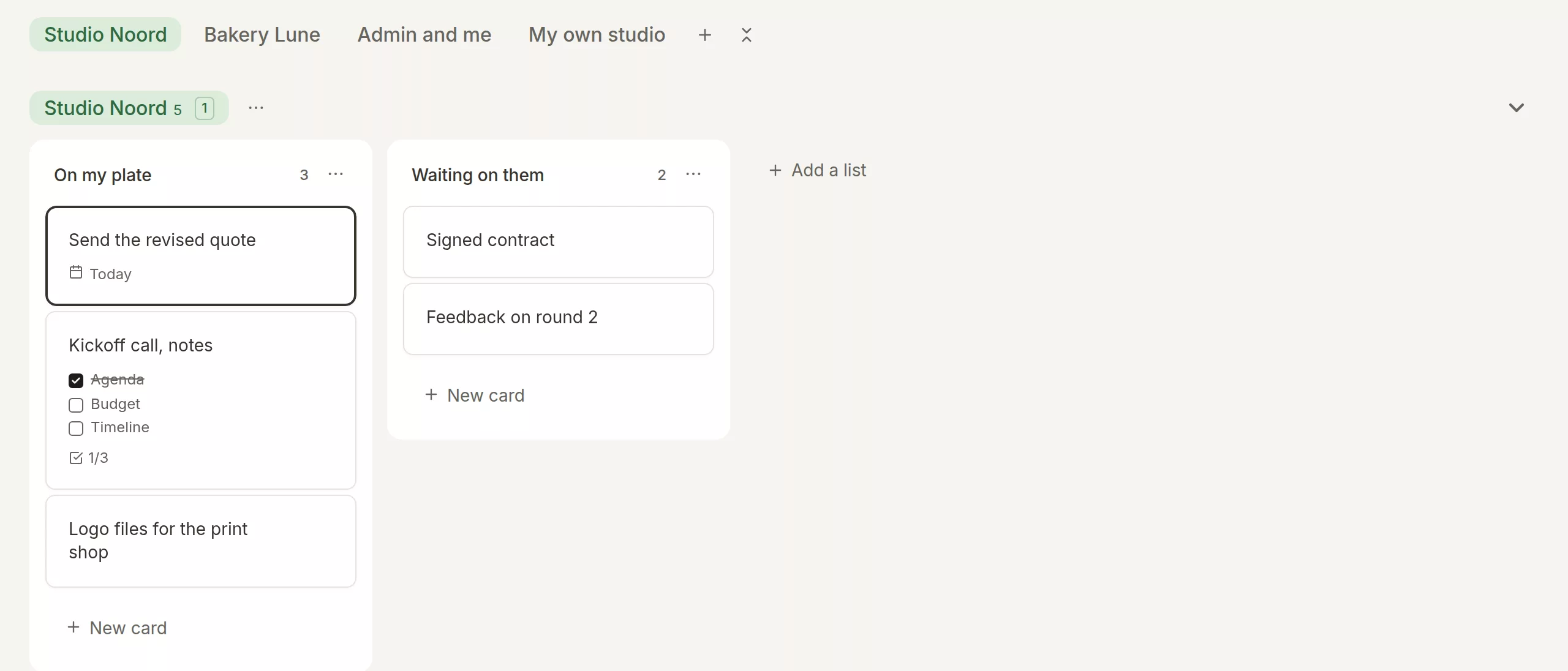
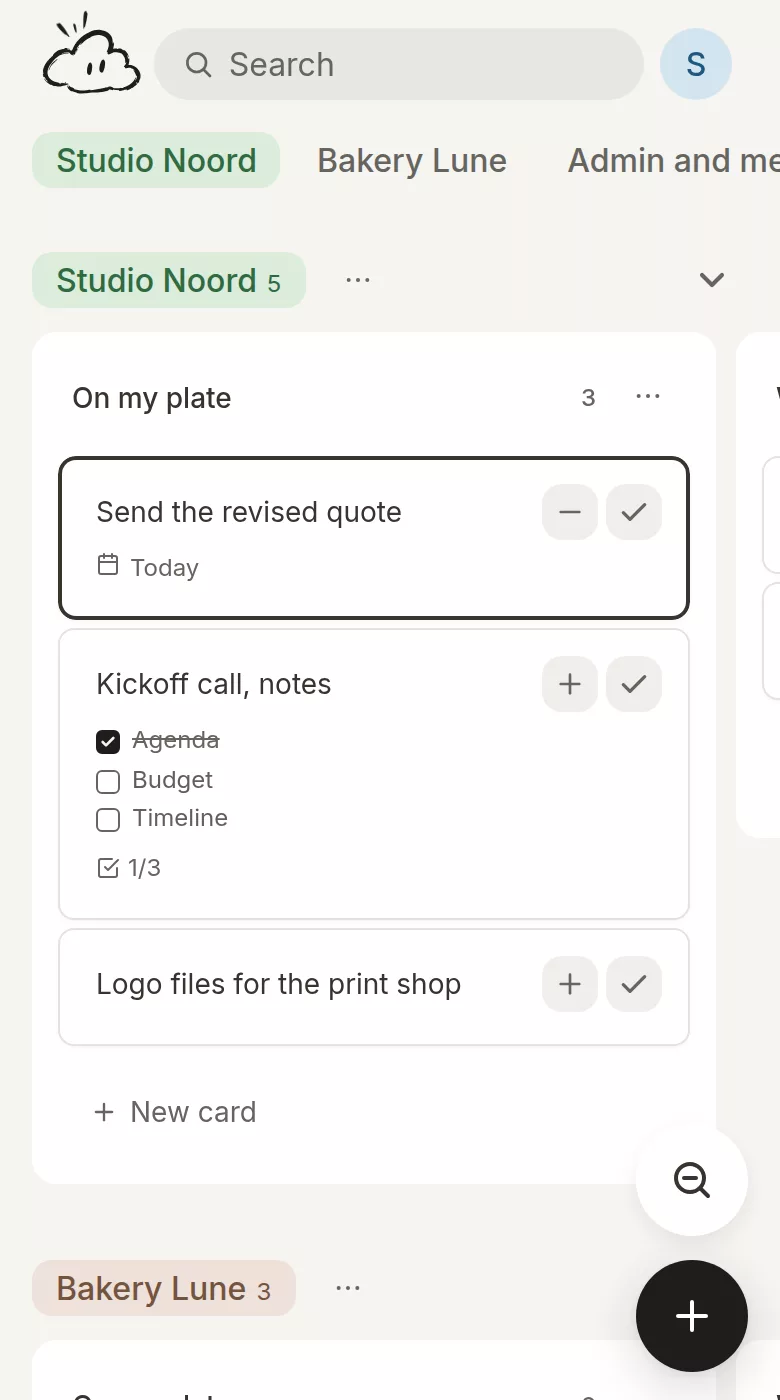
TickTick’s Today is a smart list: it shows the tasks that are due today.3 That’s a sensible default, and it also means today is as long as whatever happens to be due. In Morrow, Today starts empty and holds only the cards you put there, five by default. Every card has a plus that puts it on Today. When the day is full, Morrow says so, and one more card means taking another off, or raising the number on purpose.
Every project on one board
TickTick organises work in folders, lists, sections and subtasks, up to five levels deep,2 and its Free plan includes a Kanban view as well.12 That’s a lot of room to be precise in. Morrow has one shape: a project for each client or part of your life, each with its own lists of cards, all side by side on one board. You never have to decide which level something belongs on, and the project that’s gone quiet sits right next to the busy one, where you’ll notice it.
A card you can write in
TickTick’s task descriptions and notes support Markdown.13 In Morrow, every card opens into a page with headings, checklists, tables, pictures and link previews. I made cards work this way because the next step and the notes about it belong together. What was said on a call and what you’ll do about it end up on one card, not in two places.
A day that has an end
I think a day needs a clear end, so Morrow gives it one. In the evening the cloud asks if you want to close the day. You see what you finished, and each card that didn’t get done gets a decision: tomorrow, a new date, back on the board, or done. It takes about two minutes, and the next morning starts from a plan you made the night before rather than from whatever happens to be overdue.
Morrow and TickTick, row by row
| TickTick | Morrow | |
|---|---|---|
| Best for | People who want lists, a calendar, focus sessions and habits in one app | People with more on their mind than fits in a day, who want one board and a small plan for each day |
| How work is organised | Folders, lists, sections, tasks and subtasks, with tags and four priorities | Projects with lists of cards on one board, and a separate Today |
| Daily planning | Smart lists for Today, Tomorrow and Next 7 Days | You choose up to five cards for Today by default, and close the day in about two minutes |
| Calendar | Shows Google, Outlook, iCloud and other calendars, and you can drag tasks into time slots | Any calendar address beside Today, read only, with the free time between meetings |
| Focus and habits | A Pomodoro timer, a habit tracker and an Eisenhower Matrix | None. Morrow keeps to your board and your day |
| Notes on a task | A description with Markdown, and separate note lists | A full page: headings, checklists, tables, pictures and link previews |
| A companion | An AI Assistant you ask, a daily report notification, and Suggested Tasks in Today | A small cloud that brings your morning brief, notices what has been waiting and closes the day with you |
| AI | An AI Assistant, voice input and recording summaries | When you ask: help choosing cards for today, rewriting text, breaking a card into steps. Each change waits for your yes |
| Sharing | Shared lists with assignees and comments | Personal only |
| Platforms | iPhone, iPad, Android, Windows, Mac, Linux, a browser extension and watches | A web app you install on your laptop and phone |
| Price | A free plan, and Premium at $49.99 a year | A free month, no card needed, then €6 a month or €54 a year |
What you’d give up with Morrow
Better to know this now than a week into moving your tasks. Morrow has no focus timer, no habit tracker and no Eisenhower Matrix. It isn’t in the App Store or on Google Play: it’s a web app you install from your browser, with its own icon and window, and it works offline. You can’t share a board or assign a card to anyone, and there’s no free plan after the first month. Morrow also doesn’t plan by the hour. A card gets a day, never a start time or a length on a timeline, and even a card you place in a free stretch between two meetings has no time attached. And there’s no direct import from TickTick.
The same Tuesday in both apps
Say you have a job, a side project and a house move going on at once, and your head is full.
In TickTick, your tasks sit in lists inside folders for work and home, with tags and priorities. You open Today and see everything that’s due,3 drag three tasks into free slots in your calendar,8 and start a Pomodoro on the first one.4 After work you tick off your habits.
In Morrow, each of the three is a project on one board. The morning brief tells you what you finished yesterday and where you left off. You put four cards on Today, with your meetings beside them. In the evening you close the day: three cards are done and the fourth moves to tomorrow. The rest of the house move waits on the board, in plain sight but not on today.
Pricing
Of the two, only TickTick can be used for free with no end date. Morrow gives you a month, then asks you to pay.
| TickTick | Morrow | |
|---|---|---|
| Free plan | Yes: 9 lists, 99 tasks per list, 2 reminders per task, 5 habits | None |
| Try it | Start on the Free plan | A free month from the day you sign in, no card needed |
| Paid plan | Premium, $49.99 a year: 299 lists, 999 tasks per list, more calendar views and task durations | €6 a month, or €54 a year |
| If you stop paying | Your data stays and the account goes back to Free | You can always export your whole board as one file |
TickTick’s prices are in US dollars as ticktick.com/upgrade lists them, read on 18 October 2026.12 TickTick’s page shows the yearly plan; a monthly plan and other currencies may be offered in the app stores. Morrow’s prices are in euros. Prices may not include tax. Check ticktick.com for the current plans.
Which one should you pick?
TickTick, if…
- You want a focus timer, a habit tracker and an Eisenhower Matrix in the same app as your tasks.
- You like planning your day by dragging tasks into your calendar.
- You need apps for Windows, Linux or your watch.
- You want a free plan, or you share lists with other people.
Morrow, if…
- Your head is full and you’d rather have fewer tools than more.
- You work on several projects and want to see them all at once.
- You want a firm limit on what goes on today.
- You’d like each day to end with a short look at what got done and what happens next.
Questions
Is Morrow a good alternative to TickTick?
It can be, if TickTick has started to feel like more than you need. Morrow has fewer parts: a board, a Today with a limit, and a short routine in the evening. If you use TickTick for its timer, its habits or its apps on every platform, Morrow won’t replace those.
Does Morrow have a Pomodoro timer or a habit tracker?
No. Morrow sticks to your projects and your day. If you want a timer or habits next to your tasks, TickTick has both.
Can I move my tasks from TickTick to Morrow?
Not directly, because there’s no import from TickTick. You can paste a list of tasks into Morrow’s brain dump, one per line, and every line becomes a card. Morrow does import whole boards from Trello and Notion.
Does Morrow plan my day by the hour?
No, and that’s deliberate. Times are the first part of a plan that a busy day breaks. Morrow shows your meetings and the free time between them beside Today, and you can drop a card into a free stretch without giving it a start time. You decide what to do today, not at what minute.
Is there a free version of Morrow?
No. Morrow is free for a month from the day you sign in, with no card needed, and then costs €6 a month or €54 a year. TickTick has a free plan with limits.12
Does TickTick have a companion like Morrow’s cloud?
TickTick has an AI Assistant that creates tasks and breaks down projects when you ask, a daily report notification, and Suggested Tasks in Today. Morrow’s cloud is a companion in the corner of the app that speaks first: it brings your morning brief, notices cards that have been waiting, and closes the day with you. Nothing changes until you say yes.
Is this comparison independent?
No. I make Morrow and I wrote this page. Every claim about TickTick links to TickTick’s own website or help centre, so you can check each one yourself, and I’ve tried to say plainly where TickTick is the better app.
Want a little less to think about?
Put every project on one board, pick a few cards for tomorrow, and close the day tonight. A month is long enough to find out whether fewer tools suits you.
No card needed.
Sources
TickTick’s website and help centre, read on 18 October 2026, and the AI features and daily summaries on 19 October 2026. TickTick is a trademark of Appest. Morrow is not connected to TickTick.
- TickTick, Home page
- TickTick Help Center, How to manage numerous tasks
- TickTick Help Center, Manage tasks with lists
- TickTick Help Center, Timer
- TickTick Help Center, Start a new habit
- TickTick Help Center, Eisenhower Matrix
- TickTick Help Center, Calendar subscriptions
- TickTick Help Center, Show tasks with calendar
- TickTick Help Center, AI features
- TickTick, Download
- TickTick Help Center, How teams can collaborate
- TickTick, Upgrade to Premium
- TickTick Help Center, Editing and formatting
- TickTick Help Center, Widgets
- TickTick Help Center, Daily notification and summary
- TickTick Help Center, What’s new
- TickTick Help Center, Achievement score and badges