A daily planner for freelancers who juggle several clients
Every client sends work your way, and your own business needs time too. Morrow keeps all of it on one board, then helps you plan a day that fits: a few tasks, your meetings beside them, and a clear end.
No card needed.
In short
- Give each client a project on one board, with your admin and your own ideas beside them.
- Each morning, choose a few cards for Today. Today holds five by default, so the day fits.
- Connect your calendar and see your calls next to your tasks, with the free time between them.
- In the evening, close the day in about two minutes: what is done, what moves, what tomorrow holds.
Why planning gets harder with every client
One client is a project. Four clients are four sets of deadlines, four inboxes and four people who each think their work comes first. Add invoices, taxes and the business you are building on the side, and your to-do list stops being a plan. It becomes a pile.
The pile causes two problems. You lose sight of what each client is waiting for. And every morning you have to decide again, from scratch, what today is for. You might solve the first with a project tool and the second with a notebook. Morrow does both in one place.
A project for each client, all on one board
In Morrow, every client gets a project. Inside it, lists hold the work the way you think about it: what is on your plate, what you are waiting for, and what can wait. Your admin and your own ideas get a project too, so nothing lives only in your head.
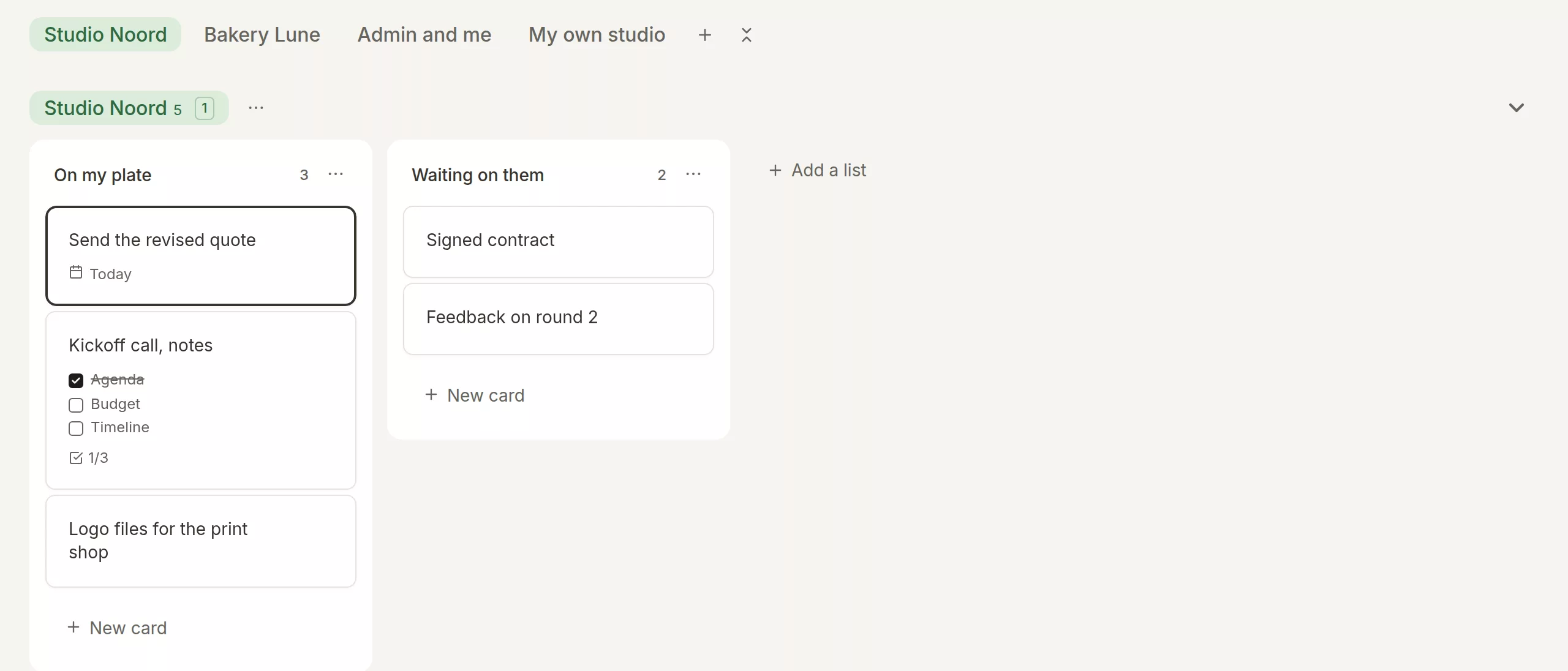
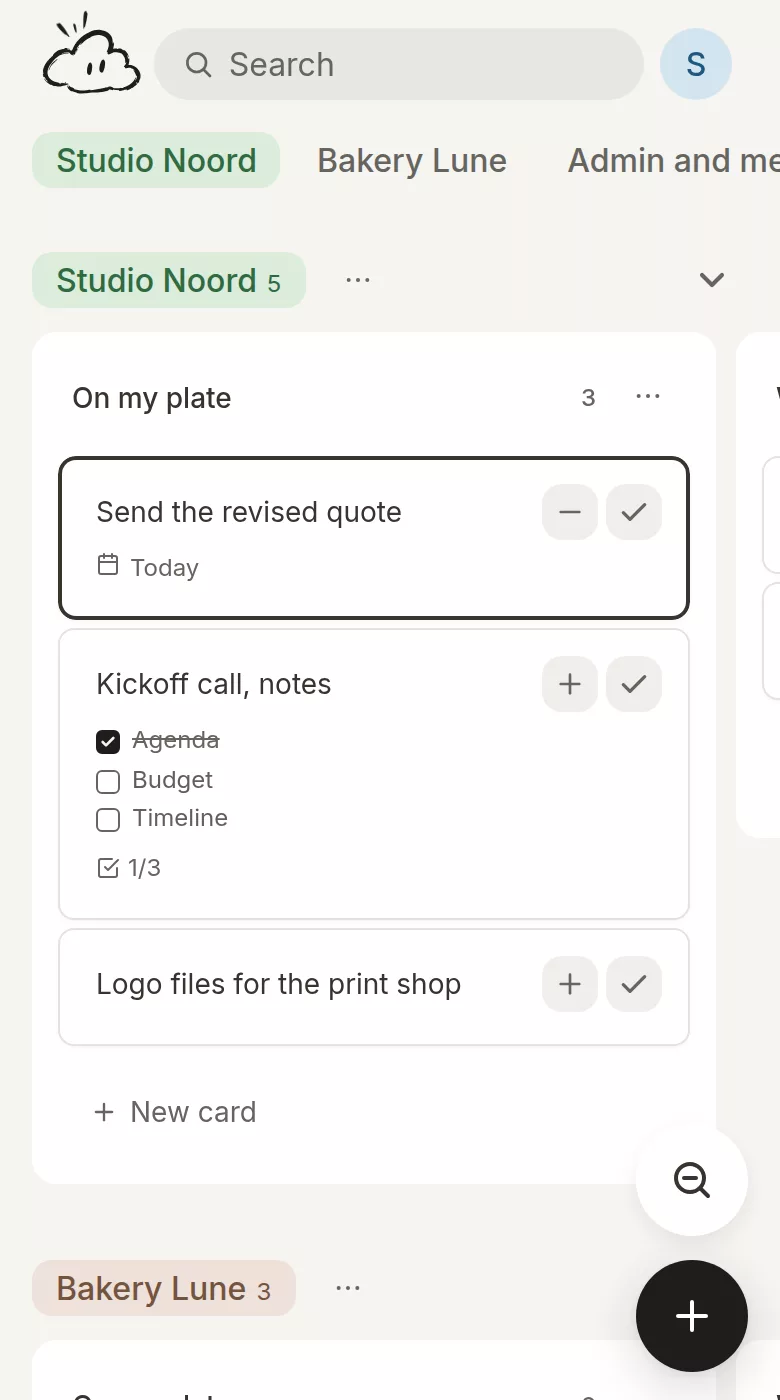
A card is more than a line of text. Open it and you have a page: notes from a call, an outline for a proposal, a checklist for a delivery, a link to a shared document. Everything about that piece of work stays with it.
Plan a day you can finish
Every card has a plus button. Press it and the card goes on Today. Today holds five cards by default. You can change that number, but there is always a number, so the day stays the size of a day.
Not sure which client comes first? Press Help me choose. Morrow looks across your whole board and suggests a few cards, each with a reason you can check, like a deadline tomorrow or a call about the same thing. You decide what goes on.
Your calls next to your tasks
Connect your Google, Outlook or Apple calendar with its calendar address. Your meetings appear beside Today, with the free time between them, so you can see how much room the day really has. Morrow only reads your calendar. It never changes it.
Got a free hour between two calls? Drag a card into it. It stays there without a start time, and you can drag it back to the list when plans change.
Capture client work the moment it arrives
A client mentions something on a call. Type it the way you would say it, like Send the invoice Friday #Bakery Lune, and Morrow sets the date and puts the card in that client’s project.
When a lot comes in at once, open the brain dump and type everything on your mind, one thing per line. Every line becomes a card, and you choose the project each one goes to.
Close the day, and start the next one where you left off
In the evening, Morrow asks if you want to close your day. In about two minutes you see what you finished, decide what happens to what is left, and choose what tomorrow holds. Then you close your laptop.
The next morning, a short brief tells you what you finished yesterday, where you left off and what is on today. Five client projects, and you still know where you are.
What Morrow is not
Morrow is for planning your own work. It does not track your hours, send invoices or give clients a portal, and you cannot share a board with a team. Keep your invoicing and time tracking where they are, and use Morrow to decide what you do with your day.
Questions freelancers ask
Can I keep personal things in the same place?
Yes. Give home, health or a side project its own project on the same board. Today then holds a few cards from all of them, so work and life are planned in one place.
Does it work on my phone?
Yes. Morrow is a web app. Install it on your laptop and on your phone, sign in on both, and you see the same board. It also works without a connection.
Can I bring my tasks from another app?
You can import a board from Trello (as JSON) or Notion (as CSV). From anywhere else, paste a list into the brain dump: every line becomes a card.
What does it cost?
The first month is free, from the day you sign in, with everything on. After that it is €6 a month or €54 a year. You do not need a card to start.
Plan your next client day in Morrow
Put every client on one board tonight, and choose tomorrow’s five before you close your laptop.
No card needed.